Schedule. Reschedule. Repeat.
Every appointment in one place. circleOS guides staff through booking, hands patients a link to do it themselves, and keeps availability honest as the day fills up.
Booking
Book it once, from anywhere.
Whether the front desk does it or the patient does, every appointment runs through the same guided flow — and the same record.
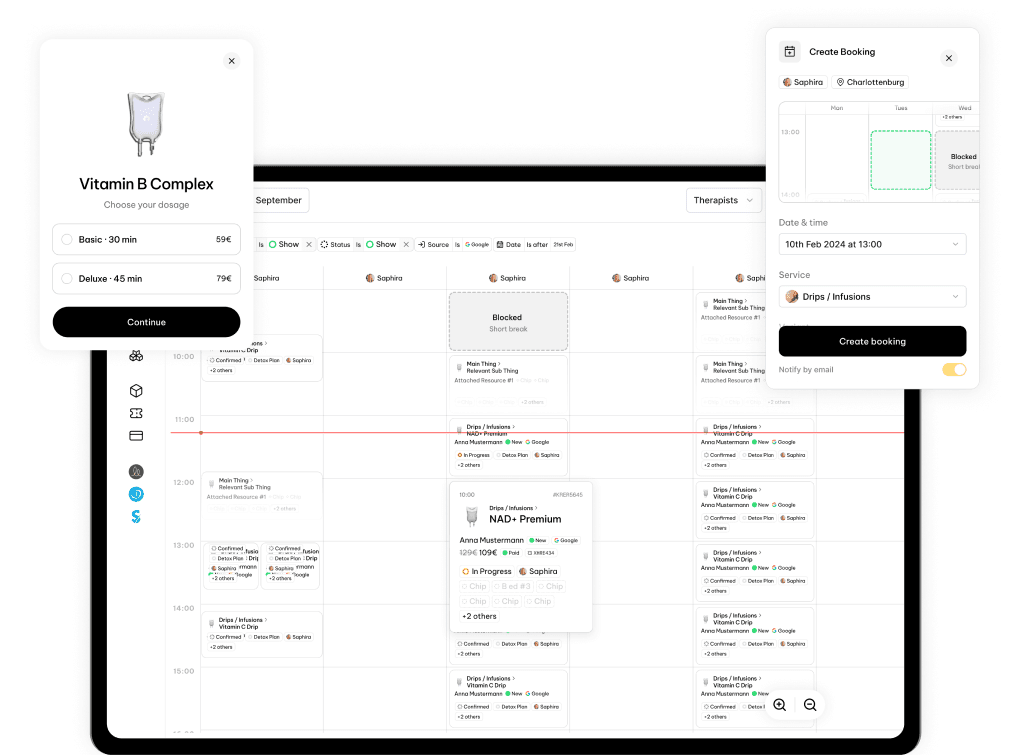
Guided booking
A short, ordered form — location, patient, service, provider, date, time — that auto-fills and skips any step the context already answers.
Patient booking links
Share a link for a service or a single variant. The patient opens the portal, picks a time, and the booking lands back in circleOS.
Patients manage their own
An appointment link lets patients open an existing booking to view the details, reschedule, or cancel — without a phone call.
Collect payment on book
Turn on the prepayment link for a service and the confirmation can carry a pay link, so the deposit is settled before the visit.
Open from anywhere
Start a booking from a patient, a location, a service, or an open slot, and circleOS carries that choice straight into the form.
Reschedule in place
Move a confirmed appointment to a new slot while keeping the patient, service, provider, and location — the new time is checked before it saves.
Cancel with a record
Cancel with a reason and a note of who acted — patient, staff, or system — and the time it happened is kept against the booking.
Mark a no-show
One action sets the booking to no-show, so the slot is freed and your day reflects who actually came in.
Status you can trust
Every booking moves through clear states — requested, confirmed, in-progress, complete, no-show, cancelled — so the list always tells the truth.
Availability
Availability that's always right.
Provider hours, breaks, capacity, and live bookings come together into one honest answer for what's open — for every location.
Real availability
Open slots are computed from each provider's weekly hours, their breaks and blocks, and the bookings already on the day — so a time only shows if it can truly be booked.
Month at a glance
See every open slot for a service across the whole month, grouped by day — the same view staff and patients book from.
Capacity per slot
Set how many patients a slot can take. circleOS counts what's booked and turns the slot away once it's full, so group sessions and shared times stay within limits.
Any available provider
Let a patient book 'any therapist' and circleOS assigns a free provider for the chosen slot at confirmation — or let them pick a specific one.
Set hours, breaks and blocks
Define recurring weekly hours per provider at each location, with multiple intervals a day, then drop in one-off unavailability when someone needs time out.
Availability per location
Hours and slots are computed per location, so a provider working across sites keeps a schedule that's correct at each one.
Confirmations and reminders
Each service sets its confirmation, reminder, and survey defaults; a per-action toggle lets staff override whether a patient is notified for any single booking.
Assign and delegate
Hand a booking to a specific staff member for follow-up, separate from the treating provider, and track whether they've accepted it.
Build your own flow
Drive your own patient booking experience — your pages, your steps — while every appointment still lands in circleOS.
From open slot
to day of.
One path from setting your hours to seeing the patient — booked by staff or by the patient, and kept in sync the whole way.
- 01Set upEnable scheduling, set each provider's weekly hours and location, and choose the booking defaults for every service — confirmations, reminders, and surveys.
- 02Staff booksOpen the bookings page and step through location, patient, service, provider, date, and time. circleOS skips anything already known and you confirm.
- 03Or the patient booksShare a service or variant link. The patient picks a time in the portal, the slot is validated, and the booking syncs straight back into circleOS.
- 04Availability resolvescircleOS applies provider schedules, breaks, and per-slot capacity to offer only genuinely open times — and turns a slot away the moment it fills.
- 05Prepayment, if you ask for itWhen a service uses a prepayment link, the confirmation can carry a pay link so the deposit is taken before the visit.
- 06Reschedule or cancelStaff or patient move the time or cancel with a reason. circleOS records who acted, notifies if enabled, and updates the booking's status.
- 07Day ofMark the booking in-progress, show, or no-show. circleOS emits the event so follow-up work — forms, tasks, the visit itself — can pick up.
Add-ons
Connect payments and reminders.
Scheduling works end-to-end on circleOS. When you want them, optional integrations take the deposit on book and deliver patient reminders.

Stripe
Use Stripe as a payment provider for online checkout.

Knock
Powerful notification infrastructure.
Fill the day, not the inbox.
Guided staff booking, patient self-service links, and availability that's always right — all in one place.
Explore the rest of circleOS
Patient Portal
v0.1.9Extend beyond your walls & opening hours.
Onboarding
v0.1.2Meet your patients, before you see them.

Live Mode
v0.1.0The important stuff, front and centre.
Circle Intelligence
v0.0.9Your contextually-aware clinical assistant.
Notes
v0.1.2Living, breathing, context aware.
Documents
v0.0.1Patient-facing writing, kept tidy.